How do I view my video full-screen?
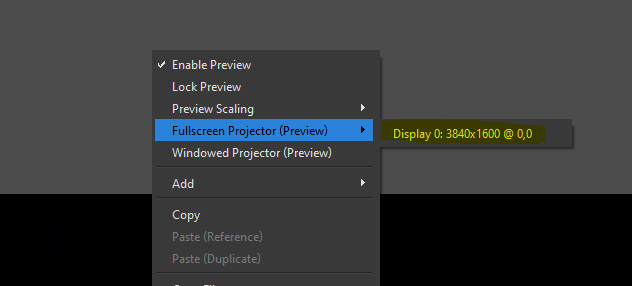
For those with versions of OBS before v32, please follow these instructions
You can easily view your video in full-screen mode in OBS by following the below steps:
- Open the Scene you would like to view full screen
- Right-Click in the grey border of the image
- Click Fullscreen Projector (Preview)
- Click the display you wish to project onto fullscreen. The default is “Display 0:“
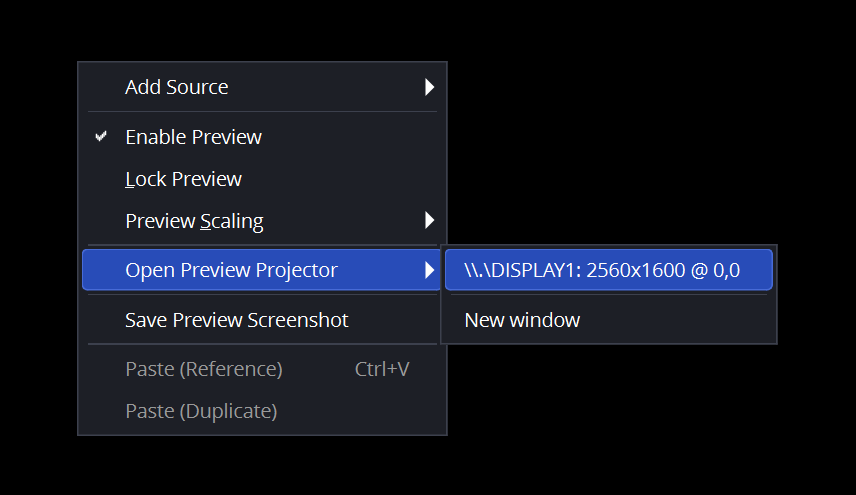
For those with versions of OBS after v32, please follow these instructions
You can easily view your video in full-screen mode in OBS by following the below steps:
- Open the Scene you would like to view full screen
- Right-Click in the grey border of the image
- Click Open Preview Projector
- Click the display you wish to project onto fullscreen. Your primary display will be the top option, but if you have multiple displays your selection may differ.